Examples
Worked, runnable examples of driving Windows with MCEC. Each one is written to serve two readers at once: a person skimming to see what MCEC can do, and an agent that executes it. So every example leads with the artifact and the plain-English prompt, then gives the exact recipe an agent follows.
The gallery
| Example | Flavor | What it shows | Recipe |
|---|---|---|---|
| MCEC hero GIF | Scripted recipe | One MCEC drives a second MCEC through a guided tour (Settings tabs, mouse-resize, drag the title bar, Help ▸ About) while the overlay narrates; recorded with the record tool. |
hero-gif.md |
| WinPrint hero GIF | Scripted recipe | MCEC drives installed WinPrint through a guided tour (launch, settings/zoom, Print to PDF), recorded as a clean, window-only GIF. Owned and produced in the WinPrint repo. | hero-gif-win.md |
| Paint → smiley → email | Prompt demo | Hand a computer-use agent one sentence and it drives the desktop: open Paint, draw a smiley, copy it, start a new email, paste it in. | paint-smiley-email.md |
Two flavors
- Scripted recipe. A deterministic, choreographed tour that produces a specific artifact (a hero
GIF) held to a visual bar. The recipe is a precise, numbered sequence of tool calls, and it doubles as a
regression test: re-running it is how the artifact is regenerated, so the doc can’t drift from what
actually works. Committed doc images (PNG/GIF under
docs/) are always produced this way — see doc-images.md. - Prompt demo. A natural-language task you hand a capable computer-use agent, which it improvises
with MCEC’s tools. The point is to showcase the capability surface, not a pixel-perfect artifact, so the
maintainer recipe (under
dev/) is mostly the prompt, the gates it needs, and a reference path — not a committed site GIF.
How these examples work
Everything below is common to every example; individual pages assume it and don’t repeat it.
- Bootstrap a controller first. An agent can’t drive MCEC over MCP before anything is listening, so one
small in-repo script stands up the first authorized, MCP-serving MCEC (for the mcec hero that’s
scripts/Generate-HeroGif.ps1; it prints a machine-readableHERO_MCP_URL=). From there the agent does the rest over MCP; no tour logic ships in the repo. - Drive a disposable subject, not your install. The controller
provision-sessions a throwaway copy (or the recipe launches a clean copy from its own dir) and drives that, so a crash never leaves your installed MCEC with agent gates enabled. - The MCP envelope is double-wrapped. A tool’s
{ ok, result, error }envelope arrives as a JSON string inside the JSON-RPCresult.content[].textblock. Unwrap it, branch onok, then readresult(success) orerror.code(failure). See the reference call in hero-gif.md. - Pass absolute paths. The controller’s working directory is its disposable copy, so any repo path you
hand a tool (e.g.
record stop’sfile) must be absolute or the output lands in the temp copy and is lost. - Targeting gotchas that bite every recipe:
- Element-by-name is global AND a substring match.
click/querywithat: { by: name }resolves across all top-level windows (not just the one you targeted byhandle/window/foreground), and it matches on substring, not exact text. Two failure modes: a name in two windows (a “File” menu in both the controller and the subject; a WinForms tab whose TabItem header and its page share a Name) is ambiguous and fails withselector-matched-2; and a name that is a substring of another silently hits the wrong one (ok, no error):value:"Serial Server"selects the Server tab. Window-title matching has the same trap:window:"Settings"matches the Windows Settings app when it is open, not your dialog. Drive menus by keyboard (Alt+mnemonic viasend_command shiftdown:alt/chars:<x>/shiftup:alt; read the real mnemonic from the source.Designer.cs). For anything that can collide, target by handle: open the window/dialog, read its handle fromquery { foreground:true }(the unwrapped envelope isresult.window.handle), then passhandleto everycapture/click. Always re-view each screenshot - the wrong tab looks plausible. - Tabs report null bounds; compute the header point yourself. A WinForms
TabItemcomes back fromquerywithbounds: null, so you can’t read a center pixel to click. Compute it from the dialog’s window rect (query { handle }->result.windowgivesx/y): the tab strip sits at client-y ~27, tabs left to right; screen point =(winX + 8 + tabCenterX, winY + 31 + 27)(8 = Win11 side border, 31 = title bar). Coordinate-click that. PrintWindowcaptures the Win11 invisible frame as black. Acaptureof a window includes the 8px invisible resize-border on the left/right/bottom as a black band (top is clean); crop those three sides (or capture a region). A FixedDialog captured at 491x412 crops to 475x404.- Ctrl+key needs a real accelerator, not
chars:. A heldshiftdown:ctrlpluschars:cinjects a character, which does not reliably trigger an app’s Ctrl+key accelerator (so Ctrl+A/Ctrl+C/Ctrl+V can silently do nothing). Send VK+modifier SendInput commands instead (built-insctrl-x,ctrl-a,ctrl-c,ctrl-v,ctrl-z,ctrl-s). Menu mnemonics viachars:are fine because those are plain characters.
- Element-by-name is global AND a substring match.
Adding an example
Copy this skeleton to dev/<name>.md, fill it in, and add a row to the gallery table above (link to the
GitHub blob URL under dev/). Keep the prompt at the very top so a human sees the payoff first and an
agent finds the task fast. Scripted recipes that produce a committed asset (e.g. hero.gif) still land
the GIF/PNG under docs/.
# <Title>
<One sentence on what it shows.> <Embed the artifact: .>
**Flavor:** Scripted recipe | Prompt demo
## The prompt
> <The exact natural-language instruction you'd give an agent.>
## Preconditions
- Gates/commands to enable (link [Agent Safety](/mcec/safety-emergency-stop-and-provisioning.html)).
- Bootstrap script, if one is needed.
## Recipe
<Numbered tool-call steps (scripted), OR "hand the agent the prompt and let it improvise" (prompt demo).>
## Expected result
<What success looks like: the artifact, frame count, the final on-screen state.>
## Gotchas
<Anything specific to this example beyond the shared list in examples.md.>
See also AGENTS.md for the connect-time guidance an agent gets, and Agent Control for the full tool reference.
Example mcec.commands recipes
Community-contributed mcec.commands recipes. They may serve as inspiration when building your own
command table (see Remote Control for the Commands
window and XML format).
Start playing the movie Blade Runner on Netflix
<startprocess cmd="bladerunner" enabled="true" file="shell:AppsFolder\4DF9E0F8.Netflix_mcm4njqhnhss8!Netflix.App">
    <pause args="5000" enabled="true" />
    <sendinput enabled="true" alt="false" ctrl="false" shift="false" win="false" vk="VK_TAB" />
    <sendinput enabled="true" alt="false" ctrl="false" shift="false" win="false" vk="VK_TAB" />
    <sendinput enabled="true" alt="false" ctrl="false" shift="false" win="false" vk="VK_RETURN" />
    <pause args="1000" enabled="true" />
    <chars args="Blade Runner" enabled="true" />
    <pause args="1000" enabled="true" />
    <sendinput enabled="true" alt="false" ctrl="false" shift="false" win="false" vk="VK_RETURN" />
    <pause args="1000" enabled="true" />
    <sendinput enabled="true" alt="false" ctrl="false" shift="false" win="false" vk="VK_TAB" />
    <sendinput enabled="true" alt="false" ctrl="false" shift="false" win="false" vk="VK_TAB" />
    <sendinput enabled="true" alt="false" ctrl="false" shift="false" win="false" vk="VK_RETURN" />
    <sendinput enabled="true" alt="false" ctrl="false" shift="false" win="false" vk="VK_TAB" />
    <sendinput enabled="true" alt="false" ctrl="false" shift="false" win="false" vk="VK_RETURN" />
</startprocess>
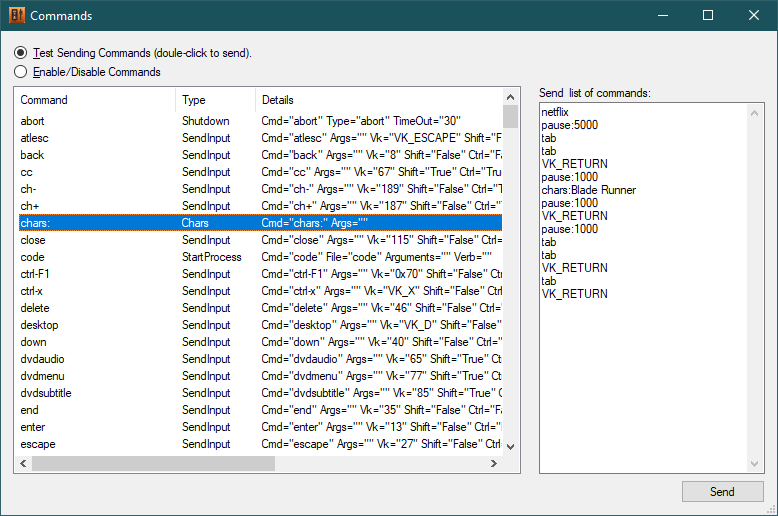
The same flow can be driven as discrete commands from the Commands window test client:
Start Notepad and do stupid tricks with the window
<StartProcess enabled="true" Cmd="notepad" File="notepad.exe" > <!-- start notepad -->
    <Pause Args="100"/>                          <!-- wait 100ms for it to start -->
    <Chars Cmd="test" Args="this is a test." />  <!-- type some text -->
    <SendInput vk="VK_RETURN"/>                  <!-- hit enter -->
    <Pause Args="100"/>                      <!-- pause -->
    <SendInput vk="VK_RIGHT" Shift="true" Win="true"/> <!-- Win-Shift-Right to move Notepad to 2nd monitor -->
    <Pause Args="100"/>                      <!-- pause -->
    <SendMessage Cmd="maximize" Msg="274" wParam="61488" lParam="0" /> <!-- maximize notepad -->
    <SendInput vk="VK_RETURN"/>                  <!-- hit enter -->
    <Chars Args="Second "/>                      <!-- type a second line of text -->
    <Chars Args="line.." />
    <SendInput vk="h" Alt="true"/>           <!-- Alt-H, Alt-A to pop Help About dialog -->
    <SendInput vk="a" Alt="false"/>
</StartProcess>
Move the mouse
<Chars enabled="true" Cmd="movemouse">
<Mouse Args="mm,100,100"/>
<Pause Args="250"/>
<Chars Args="moved"/>
</Chars>
Controlling HDHomeRun
<StartProcess enabled="true" Cmd="Start_HDHomeRun" File="C:\AppShortcuts\HDHomeRun.lnk" />
<SendInput Cmd="Nfs" vk="13" Shift="false" Ctrl="false" Alt="true" />
<SendInput Cmd="Npause" vk="81" Shift="false" Ctrl="true" Alt="false" />
<SendInput Cmd="Nplay" vk="80" Shift="false" Ctrl="true" Alt="false" />
<SendInput Cmd="Nstop" vk="83" Shift="false" Ctrl="true" Alt="false" />
<SendInput Cmd="Nrecord" vk="75" Shift="false" Ctrl="true" Alt="false" />
<SendInput Cmd="Nch+" vk="33" Shift="false" Ctrl="false" Alt="false" />
<SendInput Cmd="Nch-" vk="34" Shift="false" Ctrl="false" Alt="false" />
<SendInput Cmd="Nprev" vk="87" Shift="false" Ctrl="true" Alt="false" />
<SendInput Cmd="Ntvguide" vk="F1" Shift="false" Ctrl="false" Alt="false" />
<SendInput Cmd="Nrew" vk="82" Shift="false" Ctrl="true" Alt="false" />
<SendInput Cmd="Nfwd" vk="70" Shift="false" Ctrl="true" Alt="false" />
<SendInput Cmd="Nskipback" vk="37" Shift="false" Ctrl="true" Alt="false" />
<SendInput Cmd="Nskipfwd" vk="39" Shift="false" Ctrl="true" Alt="false" />
<SendInput Cmd="Nexit" vk="115" Shift="false" Ctrl="false" Alt="true" />
<SendInput Cmd="Nmute" vk="173" Shift="false" Ctrl="false" Alt="false" />
Start Media Center (eHome)
<StartProcess enabled="true" Cmd="mcestart" File="C:\windows\ehome\ehshell.exe">
<nextCommand xsi:type="SendMessage"
            ClassName="ehshell"
            Msg="274" wParam="61488" lParam="0" />
</StartProcess>