Environment Controller
MCEC 3.0 turns the MCE Controller daemon into a small, opt-in automation server for AI agents and scripts running on a Windows PC. It gives an agent three things:
- Eyes: capture a screenshot of a window (or the foreground window) as a PNG.
- Hands: invoke any existing MCEC command (the actuation layer you already use).
- A front door: query/find windows and UI elements, wait for conditions, and drive all of the above over MCP (Model Context Protocol) or a tiny HTTP floor.
The agent surface is a set of new commands (capture, query, displays, windows, find,
wait-for, invoke, record, launch, drag, click, and focus) exposed as tools over MCP/HTTP
so an agent can call them directly. Each tool call returns a structured JSON result
envelope ({ ok, result, … }) instead of free text, so an agent can reason about
success and failure uniformly.
This release is purely additive. No existing HTPC command, transport, or default is changed. If you do nothing, MCEC behaves exactly as it did before; every new capability is off by default and must be explicitly enabled.
SECURITY: read this first
Enabling the agent surface lets an agent act with your rights. MCEC drives the desktop with
real user input, and there is no OS sandbox around what an enabled command may touch: within its
capability, an enabled command acts as you on whatever it targets (invoke/click can operate any
control, launch can start any program, capture can read any window). What the gates below control is
the capability surface, not a per-target sandbox. The agent surface is off until you opt in, and every
command ships individually disabled, so you choose exactly which commands an agent may run; you can, for
example, allow read-only observation (query/capture) with no actuation at all. Every action is
audit-logged, and the operator can halt the session instantly with the emergency-stop hotkey (see
Agent Safety). The safest posture is a disposable
provisioned session rather than opening up your installed
instance; enable the agent surface only where you accept an agent acting as you on whatever the enabled
commands can reach.
With that understood: the agent server is locked down by default and uses layered, independent opt-ins. Turning one thing on does not turn the others on.
-
Agent commands are DISABLED by default. The new observation/automation commands require their own opt-in,
AgentCommandsEnabled, inmcec.settings. This is a separate switch from the existing actuation/command enable; enabling MCEC to run commands does not enable the agent surface, and vice-versa. Every individual command also remainsEnabled=falseuntil you turn it on, exactly as with all other MCEC commands. -
The MCP / HTTP façade is DISABLED by default. The network-facing server (
McpServerEnabled) is off unless you opt in. Even when enabled, the HTTP floor binds to localhost by default, and a loopback bind is the only configuration that needs no authentication. A loopbackMcpBindAddress(localhost, or a literal loopback IP; any127.x.y.z,::1/[::1]) is canonicalized before it reaches the listener; so obfuscated loopback spellings the OS parser still reads as loopback (e.g.127.1,0x7f.0.0.1,2130706433,::ffff:127.0.0.1) are normalized to a plain loopback literal (127.0.0.1/[::1]) rather than passed through raw, closing a path where the underlying HTTP stack could treat the raw form as a wildcard binding. A non-loopback bind (a specific LAN IP, or the all-interfaces0.0.0.0/::) is a deliberate off-box exposure and is allowed only whenMcpAuthTokenis set; without a token MCEC refuses to start the HTTP listener, logging a loud error, so a config typo can never silently expose unauthenticated UI automation to the network. (TheHttpListenerwildcards+/*and other hostnames are not loopback and are never DNS-resolved, so they too require a token; and generally fail to bind.) -
Every agent action is loudly audited: on screen and in the log. The on-screen command overlay is ON by default (
CommandOverlayEnabled, docked perCommandOverlayPosition): it narrates each command as it executes, so anyone looking at the screen can see that MCEC is driving the machine. In addition, each agent command logs anAGENT-AUDIT:line (action + target) before it runs; intentionally noisy so agent activity is impossible to miss in the MCEC log window or log files. If you see the overlay narrating orAGENT-AUDIT:lines you did not expect, something is driving your machine; hit the emergency stop (defaultCtrl+Alt+Shift+S).
If any one of these switches is off, the corresponding capability simply refuses to run and returns a JSON failure (for commands); it never silently proceeds.
Which gate applies where. The agent tools (capture/query/displays/windows/find/wait-for/invoke/
record/launch/drag/click/focus) are gated by both AgentCommandsEnabled and the per-command Enabled
flag, over both MCP transports (mcec.exe --mcp stdio and the HTTP floor): a tools/call for a
command whose Enabled=false is refused (error.code: command-disabled) even when
AgentCommandsEnabled=true.
send_command is transport-sensitive. It is a raw pass-through to the existing command engine,
so it is a command-injection surface. Over the local stdio transport (mcec.exe --mcp, launched by its
client; no network/CSRF surface) it keeps the documented pass-through and does not require
AgentCommandsEnabled. Over the network-facing HTTP floor it honors the same AgentCommandsEnabled
gate as every other tool: with McpServerEnabled=true but AgentCommandsEnabled=false, a send_command
tools/call is refused (error.code: agent-commands-disabled) and never executed. This is deliberate
secure-by-default hardening; enabling the HTTP floor alone must not expose a raw-command surface with no
agent opt-in. Before the front-door validation landed, such a request was reachable by browser CSRF /
DNS-rebinding; with the Host/Origin/token gate now in place and this AgentCommandsEnabled gate,
that surface is closed. In both cases the raw command it runs is still subject to that command’s own Enabled
flag in mcec.commands (the normal MCEC gate). McpServerEnabled gates only the HTTP floor; it has no
bearing on stdio or on which individual tools may run.
The command queue is bounded. Commands (from any client: network, serial, or an agent’s
send_command) are queued and executed paced (CommandPacing delay between items). To prevent a remote
memory/CPU DoS the queue is capped at 200 pending commands, and a single command’s whole tree (the
command itself plus all recursively embedded commands) at 50. Enqueue is all-or-nothing: a command
that breaks either bound, or whose tree doesn’t fit in the queue’s remaining capacity, is dropped whole
and logged (a CommandInvoker warning in the MCEC log); never partially enqueued, since a split tree
could separate paired input commands (e.g. shiftdown:/shiftup:) and leave a modifier key latched.
Agents should batch or pace long input sequences (e.g. prefer drag/mouse:drag over long mouse:mt
streams) rather than flooding the queue.
How to enable
Edit mcec.settings (in your MCEC settings directory) and set the opt-ins you
want. At minimum, to use the agent commands at all:
<AgentCommandsEnabled>true</AgentCommandsEnabled>
To additionally expose the MCP / HTTP server so agents can connect over a transport:
<McpServerEnabled>true</McpServerEnabled>
<!-- Optional; these are the defaults: -->
<McpBindAddress>127.0.0.1</McpBindAddress>
<McpHttpPort>5151</McpHttpPort>
Restart MCEC after editing the settings file. Remember you must also enable the
individual agent commands you intend to use (they ship Enabled=false like every other
command).
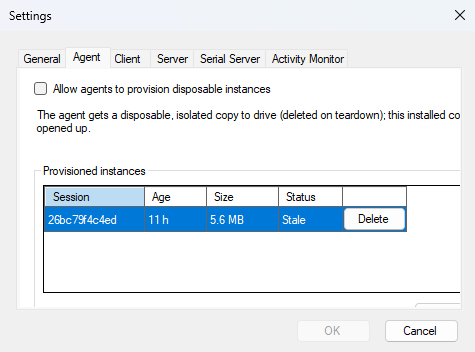
The recommended path, though, is to leave these gates off and instead tick Allow agents to provision disposable instances on the Settings dialog’s Agent tab. The agent then drives a fresh throwaway copy (deleted when done) rather than this installed one, and the same tab cleans up any it leaves behind. See session provisioning.
The commands
All commands target a window the same way; by window (title substring,
case-insensitive), handle (HWND), process (process name without .exe),
className, or foreground (the current foreground window).
| Command | What it does | Key args |
|---|---|---|
capture |
Screenshot a window (PrintWindow + PW_RENDERFULLCONTENT, captures WinUI/WPF surfaces) or a screen region, returned as base64 PNG. Blank/black frames are detected and flagged (see Observation hardening). |
window target, or region x/y/width/height; optional file |
query |
Dump the UI Automation tree of a window: control type, name, automation id, bounds, enabled/offscreen state, value. | window target, maxDepth (default 6), maxNodes (default 1000) |
displays |
Report display geometry; every monitor’s pixel bounds, workingArea, primary flag, and dpi/scale, plus the union virtualBounds. Lets an agent interpret the absolute-pixel bounds query/find return and place pixel clicks/drags without measuring the screen itself. |
(none) |
windows |
Discover top-level windows and wait on window state: list each window’s handle, title, className, processName, processId, and bounds, so an agent can target a window instead of guessing. Optionally filtered; with a timeout it waits for condition: appears (default; a match exists), disappears (no window matches, e.g. a modal closed), or foreground (a match is the foreground window). No filter lists all; a wait (or disappears/foreground) with no filter is refused. A timeout carries waitedFor + lastObservedWindows for triage. |
window/process/className filters, condition (appears/disappears/foreground), timeout (ms) |
find |
Find a UI Automation element by name / automation id / class. | window target, by (name|automationid|classname), value, timeout |
wait-for |
Same as find, but waits up to a timeout for the element to appear (default 5 s). |
window target, by, value, timeout |
invoke |
Drive a UI Automation element pattern (incl. select for SelectionItem); far more reliable than coordinate clicks. | window target, by, value, action (invoke|toggle|setvalue|setfocus|expand|collapse|select), text |
drag |
Press → move along a path → release, dispatched atomically (nothing interleaves). Each endpoint is a UI Automation element (dragged from/to its centre) or an absolute screen pixel; add path waypoints for a curved/multi-stop drag. Covers window resize/move by chrome, sliders, marquee-select, drag-reorder. |
window target (needed when an endpoint is an element); from/to each { by, value } or { x, y }; optional path [{ x, y }, …] |
launch |
Launch an app directly (path + args + working dir); gated. Returns pid and primary window handle/info when the window appears. Preferred over Win+R composition. | path (required), arguments, workingDirectory, timeout |
click |
Click at a point (a UI Automation element’s centre or an absolute screen pixel); move+click is dispatched atomically. For element types invoke can’t drive, or when you must target a pixel. Prefer invoke for ordinary buttons/menus. |
window target (needed when at is an element); at = { by, value } or { x, y }; button (left|right|middle, default left); count (1|2, default 1) |
focus |
Give a window (and optionally a control in it) real keyboard focus so send_command/chars keystrokes reach it. Foregrounds the window, clicks the control (a real click focuses custom-drawn surfaces a bare setfocus misses; e.g. a MAUI GraphicsView), then verifies. Fails foreground if the window won’t activate, focus if no control takes focus. Use before firing an app’s own keyboard shortcut at a specific surface. |
window target; optional at = { by, value } or { x, y } (omit to just foreground + confirm focus) |
record |
Record a window or region to an animated GIF over time (start/stop or a bounded one-shot). | window target, or region x/y/width/height; action (start|stop|oneshot), fps, durationMs, maxWidth, file |
Why purpose-built tools, not the raw command set. MCP’s value is typed discovery, so the agent
surface is a small set of purpose-built tools rather than a 1:1 mapping of every legacy MCEC command.
Each new tool supersedes the raw commands it replaces and is more reliable for an agent to drive:
launch replaces the startprocess/Win+R dance and returns the new window’s handle; click and drag
replace hand-rolled mouse: sequences and dispatch their move+click / press-move-release atomically
(raw mouse:lbd/mouse:mt/mouse:lbu can interleave with other input); invoke and focus replace
the keystroke/message combinations once used to drive and target controls. send_command remains the
escape hatch: it runs any raw MCEC command (including the legacy startprocess/mouse:/sendmessage/
keystroke commands) for cases a typed tool doesn’t cover, trading typed discovery for full reach. So the
catalog stays small and legible while nothing from the underlying command set is lost.
Every MCP tool call returns one result envelope. An agent branches on ok first; on
success it reads result, on failure it reads error:
{
  "ok": true,
  "result": { /* tool-specific payload */ },
  "warnings": [ { "code": "tree-truncated", "detail": "…" } ],
  "sessionId": "5f19c9c01a3f"
}
A result is either a success (ok: true, result present, no error) or a failure
(ok: false, error present, no result); never both. warnings (non-fatal conditions)
may appear on either. sessionId names the session the call ran in (the
implicit default session unless the call routed itself with a sessionId argument).
Over MCP, the transport’s isError flag mirrors the envelope (isError = !ok).
On failure the error object carries a stable, fine-grained code, a coarse category from
the closed taxonomy (timeout, ambiguous-selector, stale-element, no-target,
invalid-argument, capture-blank, focus, elevation, foreground, internal; the focus
tool produces focus and foreground when it cannot confirm focus or foreground on the target), a
human-readable detail, and (when available) a lastObservation (the last good state before
the failure, so a failed call is debuggable without rerunning it) and a partialResult (the
failing call’s own partial payload, e.g. a blank capture’s suspect PNG):
{
  "ok": false,
  "error": {
    "code": "window-not-found",
    "category": "no-target",
    "detail": "No matching window for selector window='Settings'.",
    "lastObservation": { /* the last good query/capture */ }
  },
  "sessionId": "5f19c9c01a3f"
}
Where the shape comes from. Internally each agent command returns a structured
CommandResultobject (src/Commands/CommandResult.cs) carryingsuccess/dataplus the mandatoryerrorCode/errorCategorytaxonomy on failure. TheAgentServerbuilds the{ ok, result, error, … }envelope from that object at the MCP boundary (AgentToolResult.FromCommandResult); no serialize/re-parse round-trip and no free-text “categorization”; which is the shape an MCP client actually receives and the one specified by the shared result contract indocs/design/agent-tool-result-contract.md. A couple of feature-specific refusals ride inerror.codewhileerror.categorystaysinternal:emergency-stopped(the operator engaged the emergency stop),provisioning-not-authorized(AllowSessionProvisioningis off), andcommand-disabled(the per-commandEnabledgate).
Agent sessions
Every result carries a sessionId; the session it ran in. A session is the server’s
memory of one task: its active target window, last observation, last action, last error, and a
per-session artifact directory (where a capture’s bytes are spilled so a later
error.lastObservation never re-embeds megabytes of screenshot). This lets a multi-step task be
one durable, debuggable record instead of a string of stateless calls.
For a single linear task you never touch sessions: omit sessionId and every call shares one
implicit default session, so state simply accumulates (and stdio “just works” with one ambient
session). To run independent tasks that must not share a target or history, use the lifecycle
tools:
session-startcreates a fresh session and returns itssessionId(plus its initial status). Echo thatsessionIdon later tool calls; each such call runs in that session and is echoed back on the result.session-statusreturns a session’s remembered state (active target, last observation/action/error, artifact dir, any emergency stop). PasssessionIdto inspect a specific session, or omit it for the default.session-endfrees a session’s server-side state. It is idempotent (ending an unknown or already-ended id reportsended: falserather than erroring). Afterward a tool call that still echoes that id is refused witherror.code: unknown-session(categoryinvalid-argument); start a new one or omitsessionIdto fall back to the default.
Identity is carried in-band, not bound to the connection. Both stdio and the HTTP floor funnel into one stateless dispatch; the store is keyed by id, not by socket, so the same
sessionIdaddresses the same session across either transport. The lifecycle tools are part of the agent surface and honor the sameAgentCommandsEnabledopt-in and emergency-stop latch as every other tool.Not the same as
provision-session. These sessions are in-process runtime state. A provisioned session is a whole disposable MCEC install on disk; a different concept with its ownsessionId/token.Tool names are hyphenated (
session-start, notsession/start) because MCP/Anthropic tool names must match^[a-zA-Z0-9_-]{1,64}$, and to match the existingwait-for/end-sessionconvention.
capture result example
capture renders the target window (using PrintWindow, so it works even when the
window is occluded) and returns the image inline as base64-encoded PNG plus the window
geometry:
{
  "ok": true,
  "result": {
    "handle": 1576490,
    "width": 1024,
    "height": 768,
    "encoding": "png",
    "bytes": 48213,
    "base64": "iVBORw0KGgoAAAANSUhEUgAA...",
    "blankCheck": { "blank": false, "dominantFraction": 0.34, "dominantIsDark": false },
    "window": {
      "handle": 1576490,
      "title": "Untitled - Notepad",
      "className": "Notepad",
      "processName": "notepad",
      "processId": 21344,
      "x": 120, "y": 80, "width": 1024, "height": 768
    }
  }
}
blankCheck reports the blank-frame analysis (see
Observation hardening). When a window capture
comes back blank the result is a failure with error.category: "capture-blank", so an agent
never trusts a silent bad image. A blank region capture is reported as a capture-blank
warning instead, since a user-specified region can legitimately be empty.
Region size limits. Region width/height are agent-controlled, so they are capped; an
unbounded region (e.g. 40000x40000 ≈ 6.4 GB of raw ARGB, before PNG encoding and base64) could
otherwise exhaust the host’s memory. A region may be at most 16384 px per side and
64,000,000 px total (64 MP ≈ 256 MB raw; roughly eight 4K frames). An oversized region is
rejected before anything is allocated or captured: the call fails with
errorCode: "region-too-large" (errorCategory: "invalid-argument"; the recovery is to
shrink the request) and a detail stating the limit,
and the rejection is AGENT-AUDIT:-logged. The same caps apply to record regions (window
targets need no cap: they are bounded by the window’s own size). These limits are fixed, not
settings: they are an anti-DoS bound sized well beyond real desktop geometry, not a tuning knob.
On a successful capture, MCEC additionally returns the PNG as an MCP image content block so
the model can view it directly, alongside the JSON envelope above.
record: capturing change over time
capture answers “what does this look like now”. When you need to show change over
time (an animation for a demo or issue report, or a repro of a transient/flicker), use
record, which writes an animated GIF.
⚠️ Privacy: a recording captures whatever is on screen for its entire duration, not just one instant; it is a louder disclosure than a still
capture. Only record what you mean to, keep recordings short, and be aware the GIF may contain sensitive content (credentials, messages, other windows). Recording is off unless the operator has enabled the agent commands, and every start/stop/write isAGENT-AUDIT:-logged.
Two ways to bound a recording:
- One-shot: give
durationMs(and optionalfps); MCEC records that long, then writes the GIF and returns metadata in a single call. - Segment:
action: "start"begins recording and returns immediately;action: "stop"ends it, encodes, writes the file, and returns metadata. Only one recording runs at a time.
Recording lifecycle. An open start is never unbounded: the capture loop auto-stops
when it hits the operator’s max duration or max frames (or the target vanishes mid-record).
An auto-stopped recording is completed, not lost:
action: "stop"still returns the buffered GIF (exactly once). A secondstopfails with “No recording is in progress or awaiting fetch”, and fetching releases the buffered frames.- A new recording (
startor a one-shot) is allowed after an auto-stop. If the auto-stopped GIF was never fetched, the new recording replaces it: the discarded output is gone, and that command’s result carries anunfetched-recording-discardedwarning (for a one-shot, on its single final reply); also audit-logged. Fetch withstoppromptly if you want the output.
Safety limits (operator-configurable in mcec.settings, requests above them are clamped,
not failed) keep an agent from producing an unbounded file:
| Setting | Default | Meaning |
|---|---|---|
AgentRecordMaxFps |
30 | Max frames per second (fps default is 5). |
AgentRecordMaxDurationMs |
60000 | Max recording length (60 s). |
AgentRecordMaxFrames |
600 | Hard cap on captured frames. |
AgentRecordMaxWidth |
1280 | Frames are downscaled so width fits this. |
A record region target is additionally subject to the fixed capture region size limits
(max 16384 px per side, 64,000,000 px total; see
Region size limits): an oversized region fails fast with
errorCode: "region-too-large" before any recording starts, rather than being clamped.
A finished record (one-shot or stop) returns the output path and metadata:
{
  "ok": true,
  "result": {
    "file": "C:\\Users\\me\\AppData\\Local\\Temp\\mcec-rec-20260629-141503.gif",
    "frames": 73,
    "durationMs": 14600,
    "fps": 5,
    "width": 1280,
    "height": 824,
    "bytes": 1048576,
    "target": {
      "handle": 1576490, "title": "Untitled - Notepad", "className": "Notepad",
      "processName": "notepad", "processId": 21344,
      "x": 120, "y": 80, "width": 1024, "height": 768
    }
  }
}
action: "start" returns { "recording": true, "fps": 5, "maxDurationMs": 60000, "target": { … } }.
If file is omitted, MCEC writes to a timestamped path under the system temp directory and
reports it in file.
No extra dependency is used: each frame is quantized + LZW-compressed to a GIF by GDI+, and
the frames are stitched into one GIF89a (Netscape loop extension + per-frame delays). See
docs/design/gif-recording.md for the full design.
query result example
query returns the window descriptor plus its UI Automation tree (depth-limited):
{
  "ok": true,
  "result": {
    "window": {
      "handle": 1576490, "title": "Untitled - Notepad",
      "className": "Notepad", "processName": "notepad", "processId": 21344,
      "x": 120, "y": 80, "width": 1024, "height": 768
    },
    "nodeCount": 7,
    "truncated": false,
    "tree": {
      "controlType": "Window",
      "name": "Untitled - Notepad",
      "x": 120, "y": 80, "width": 1024, "height": 768,
      "isEnabled": true,
      "isOffscreen": false,
      "children": [
        { "controlType": "Edit", "automationId": "15", "name": "Text editor",
          "x": 122, "y": 110, "width": 1020, "height": 720, "isEnabled": true }
      ]
    }
  }
}
Observation hardening & known limitations
An agent can only act on what it can reliably see, so capture and query are built to fail
loudly rather than hand back a plausible-looking but wrong observation. This section documents
what is trustworthy and what is not.
Blank / black frame detection
Every capture is analyzed for blank content: the frame is sampled on a bounded grid, each pixel is quantized to 5 bits per channel, and the share held by the single most common color is measured. A real application window is busy and scores low; a failed grab is a flat fill and scores ~1.0. When the dominant color covers ≥ 99% of the frame it is flagged blank, and a near-black dominant color is distinguished from a legitimately empty (e.g. white) surface.
- A window capture that comes back blank is a failure (
error.category: "capture-blank",error.code: "frame-all-black"or"frame-uniform"), so it is never a silent bad image; an agent branches on the failure rather than trusting the frame. The suspect PNG the command grabbed still rides inerror.partialResult, so the evidence is not lost. - A region capture that comes back blank is reported as a
capture-blankwarning, since a user-specified region can legitimately be empty. - The raw numbers are in the success payload’s
blankCheck(blank,dominantFraction,dominantIsDark).
PrintWindow and the on-screen-blit fallback
Window capture uses PrintWindow(PW_RENDERFULLCONTENT), which renders DirectComposition / WinUI 3
/ WPF surfaces that a plain screen grab returns black for, and captures windows even when occluded.
Known limits:
- Fallback is degraded. If the driver refuses
PrintWindow, capture falls back to an on-screen blit (Graphics.CopyFromScreen). That blit grabs whatever pixels are physically on screen, so it returns black for composited/occluded surfaces and cannot see a window that is behind another. When the fallback runs, the result carries acapture-fallbackwarning. - Minimized windows have no on-screen pixels;
PrintWindowtypically yields a blank frame (caught by blank detection). Restore the window before capturing. - Cloaked windows (e.g. background virtual-desktop or some UWP states) may not render.
- Hardware-overlay/protected content (some video players, DRM surfaces) renders black by design and cannot be captured.
Locked sessions and UAC
- Locked / disconnected sessions: when the workstation is locked or the session is detached, the desktop cannot be rendered and captures are blank. This is detected (blank frame) but cannot be worked around from user space.
- Elevation (UAC): MCEC running at medium integrity cannot read the UIA tree of, drive, or
reliably capture a window owned by an elevated (high-integrity) process. When UI Automation
reports access denied for such a target, the tool fails with
error.category: elevation(code: target-elevated) so an agent knows to stop rather than retry; run MCEC elevated only if you explicitly need to automate elevated apps, and understand the security trade-off.
UIA tree size & stability
query is bounded on two axes so its output stays stable for agent reasoning even on pathological
trees (e.g. a virtualized list with thousands of items):
maxDepth(default 6) bounds tree depth.maxNodes(default 1000) bounds the total node count. When the cap clips the walk, the result reportstruncated: trueand atree-truncatedwarning rather than silently returning a partial tree;nodeCountalways reports how many nodes were captured. RaisemaxNodesor narrow the target (deeperwindow/handleselector) for a complete tree.
Individual stale or unsupported UIA nodes never abort the whole walk; they are skipped and the rest of the tree is returned.
Using MCEC as an MCP server
MCEC can run headless as an MCP stdio server (no main window, no tray icon; the on-screen command overlay and the emergency-stop hotkey still work) so an MCP client (such as a desktop AI assistant) can spawn it on demand and talk to it over standard input/output:
mcec.exe mcp # or the equivalent legacy spelling: mcec.exe --mcp
Never point an MCP client at the installed copy. mcec.exe under Program Files
refuses mcp/--mcp (and refuses to start the MCP/HTTP endpoint) with an error
explaining the alternatives: serving agents from the installed, operator-owned copy
would mean enabling agent security gates in the one configuration the operator’s own
MCEC reads, where a crashed session leaks them enabled. Instead, either have an agent
call provision-session (see
Agent safety) to get a disposable,
isolated copy, or copy the install directory somewhere writable and point the client
there; a non-installed copy reads its own co-located mcec.settings.
The exe also exposes a CLI surface (built on
Terminal.Gui.Cli): --opencli emits machine-readable
command metadata, and agent-guide prints the same agent guidance the MCP server
hands connecting clients.
Wire it into your MCP client config (the claude_desktop_config.json / mcp.json
style used by most clients):
{
  "mcpServers": {
    "mcec": {
      "command": "C:/mcec/mcec.exe",
      "args": ["mcp"]
    }
  }
}
(C:/mcec here is a writable copy of the install directory, or a provisioned session’s
directory; the Program Files path itself would be refused, per above.)
mcp is a spawned server, not an interactive command: typed at a terminal it refuses
(stdin is an interactive console; the server would block on the shared console and
Ctrl+C could not stop it). To experiment by hand, pipe requests in
(echo '{...}' | mcec mcp). A running server stops when its client closes stdin (EOF)
or sends send_command mcec:exit (the reply flushes, then the process exits); a stuck
one can always be killed (Stop-Process -Name mcec).
The agent commands still obey the security gates above. Running
--mcpdoes not bypassAgentCommandsEnabledor the per-commandEnabledflags; set those inmcec.settingsfirst.
Tools exposed over MCP
When connected, the server advertises these tools:
| Tool | Maps to |
|---|---|
capture |
The capture command (window screenshot → base64 PNG). |
query |
The query command (describe a window). |
displays |
The displays command (per-monitor bounds + DPI/scale, virtual bounds). |
windows |
The windows command (list/filter top-level windows for discovery; wait on window state (appears/disappears/foreground) with a timeout). |
find |
The find command (match a UI element, one-shot). |
wait-for |
The wait-for command (poll for a UI element until a timeout). |
invoke |
The invoke command (run an existing MCEC command, incl. select for tabs etc). |
drag |
The drag command (atomic press → move-path → release, element or pixel endpoints). |
launch |
Direct gated app launch (returns pid + window handle). |
click |
The click command (atomic click at an element centre or pixel). |
focus |
The focus command (foreground + click + verify keyboard focus, for keystroke targeting). |
record |
The record command (window/region → animated GIF over time). |
send_command |
Generic raw-command passthrough; send any MCEC command line. |
session-start |
Start a new agent session and return its sessionId. |
session-status |
Report a session’s state (active target, last observation/action/error, artifact dir). |
session-end |
End an agent session, freeing its server-side state. |
Every observation/actuation tool and send_command also accept an optional sessionId
argument (from session-start) to route the call into that session.
Concurrency
Agent tool calls follow a simple contract so one slow call never stalls the others:
- Observation runs concurrently.
query,capture,windows,find,wait-for, andrecordtake no shared lock; a deepquery, a largecapture, or a longwait-fornever blocks another tool call, even one from a different session. They snapshot state (each UIA read uses its own automation instance; screen capture is stateless) and don’t mutate the desktop. - Global-input actuation serializes.
drag,focus, andsend_commandsynthesize physical mouse/keyboard; the one input stream is a shared resource, so they serialize on a single gate (AgentRuntime.InputGate):drag/focusactuate directly under the gate on their worker, whilesend_commandenqueues into the command engine, whose single dispatcher thread holds the same gate around each input-synthesizing queued command’sExecute(concurrent requests can’t interleave keystrokes/mouse). Commands that provably touch no input (pause,mcec:) run outside the gate, so apause:60000in a macro doesn’t starve a concurrentdragfor a minute. invokeis UIA-pattern actuation, dispatched on a worker with a short modal grace: because invoking a control can open a modal dialog that blocks synchronously,invokenever holds the input gate for the dialog’s lifetime; otherwise the agent couldn’tquery/capture/invoketo dismiss the very dialog it opened (see theinvokenotes above). Caveat; queue-path invoke: that grace exists only for theinvoketool. An invoke-style command executed from the queue (in a macro, or raw viasend_command) has no modal grace: if it opens a modal dialog, itsExecuteblocks the dispatcher; and holds the input gate; until the dialog is dismissed. The agent caller is bounded bysend_command’s 30s wait (send-command-timeout), but the queue itself stalls until the operator closes the dialog. Prefer theinvoketool for anything that may open a modal.- The legacy TCP/serial command pipeline shares the same queue and dispatcher. Home-automation
commands and
send_commandare both producers into the oneCommandInvokerqueue; its dedicated dispatcher thread is the only consumer and executes every command in order (input-synthesizing ones under the input gate), so legacy traffic and agent actuation can never interleave either.send_commandreturns only after its command actually executed (a per-enqueue completion the dispatcher signals), with a 30s wait bound; a longer-running command keeps executing, but the call reportssend-command-timeout. A command that never enters the queue fails fast instead of reporting ok:unknown-command(not in the loaded table) orcommand-dropped(over the queue bounds / engine shutting down).
Both MCP transports honor this by dispatching each request on a worker: the HTTP floor serves every
POST on a thread-pool task, and the stdio loop dispatches each line concurrently (writes are serialized;
JSON-RPC responses carry the request id, so out-of-order completion is fine). So a slow call from one
client/session never blocks another’s requests; not just callers that invoke Dispatch on their own
threads.
HTTP floor
When McpServerEnabled = true, MCEC also accepts a single JSON-RPC request per POST
over HTTP, bound to localhost only:
POST http://127.0.0.1:5151/mcp
Content-Type: application/json

{ "jsonrpc": "2.0", "id": 1, "method": "tools/call",
  "params": { "name": "query", "arguments": { "foreground": true } } }
The address and port come from McpBindAddress (default 127.0.0.1) and McpHttpPort
(default 5151). This is a deliberately minimal floor for local scripts and agents; it is
not a general-purpose web API. A loopback bind (localhost or a literal loopback IP;
127.x.y.z, ::1, [::1]) needs no authentication and is canonicalized to a plain
loopback literal before binding. A non-loopback bind is a deliberate off-box
exposure and starts only when McpAuthToken is set; otherwise the listener
refuses to start and MCEC logs a loud error explaining what to change.
Over this HTTP transport, send_command requires AgentCommandsEnabled=true (see Which gate applies
where, above): enabling the floor alone does not expose the raw-command pass-through. To drive
send_command without opting into the agent surface, use the local stdio transport (mcec.exe --mcp).
Front-door request validation (defeats CSRF and DNS rebinding)
A localhost HTTP service is still reachable by a browser: any web page the operator visits
can issue a cross-origin POST to 127.0.0.1:5151 (CSRF), and a DNS-rebinding attacker can
make the browser treat the endpoint as same-origin to read responses. To close both, every
HTTP request is validated before its body is read or any tool runs:
- Method + path: only
POST /mcpis served; anything else is rejected (405/404). Hostheader: must be a loopback authority (127.0.0.1,localhost, or[::1], and, if a port is present, the configuredMcpHttpPort). A request withHost: evil.com(the hallmark of DNS rebinding) is refused (403).Originheader: must be absent (a normal non-browser MCP client sends none) or a loopback origin. A cross-siteOrigin(http://evil.com) or an opaquenullorigin is refused (403), which stops the drive-by CSRF case.Authorization(optional, defense in depth): setMcpAuthTokento a non-empty secret and every request must carryAuthorization: Bearer <token>(constant-time compared), which additionally protects against a hostile process on the same machine. Empty (default) relies on theHost/Originchecks above.
Every rejected request is logged with an AGENT-AUDIT: line (decision, method, path, host,
origin, remote endpoint) so drive-by and rebinding attempts are visible to the operator.
Binding off-box requires a token. The
Hostcheck is a browser/rebinding defense, not a network control; a remote client can sendHost: 127.0.0.1. So ifMcpBindAddressis set to a non-loopback address (e.g.0.0.0.0) andMcpAuthTokenis empty, MCEC refuses to start the HTTP listener and logs an error. To expose the door off-box, set a bearer token (and prefer a network-level control too).
The floor is hardened against resource exhaustion: a request body larger than
1 MB is refused with 413 (the cap is enforced by a bounded read, so chunked bodies
without a Content-Length can’t bypass it), and at most 16 requests are served
concurrently; past that the server answers 503 rather than queueing.
Summary
- New, opt-in agent surface:
capture,query,displays,windows,find,wait-for,invoke,launch,drag,click,focus,record(plussend_command, andprovision-session/end-session). - Structured
{ ok, result, error, … }JSON result envelope; the commands are exposed as MCP/HTTP tools. - No per-target sandbox: an enabled command acts with your rights on whatever it targets. You control the capability surface (which commands are enabled, so read-only observation is possible), not what an enabled command may touch.
- Three independent off-by-default gates:
AgentCommandsEnabled, per-commandEnabled, andMcpServerEnabled(localhost-bound). - HTTP front-door validation:
POST /mcponly, loopbackHostand absent-or-loopbackOriginrequired, optionalMcpAuthTokenbearer token; defeats browser CSRF and DNS rebinding. - On-by-default on-screen overlay narrating every command, plus loud
AGENT-AUDIT:logging for every agent action. - Fully additive; nothing about the existing HTPC behavior changes.
Agent safety
Two operator-safety features build on the gates above: a global emergency stop hotkey that halts a session instantly from any window, and disposable isolated session provisioning so an agent drives a throwaway copy instead of your installed instance. Both are covered in Agent Safety.