Paint → smiley → email
Hand a computer-use agent one sentence and it drives the whole Windows desktop with MCEC: open Paint, draw a smiley, copy it, start a new email, and paste the drawing in. A capability demo, not a fixed artifact.
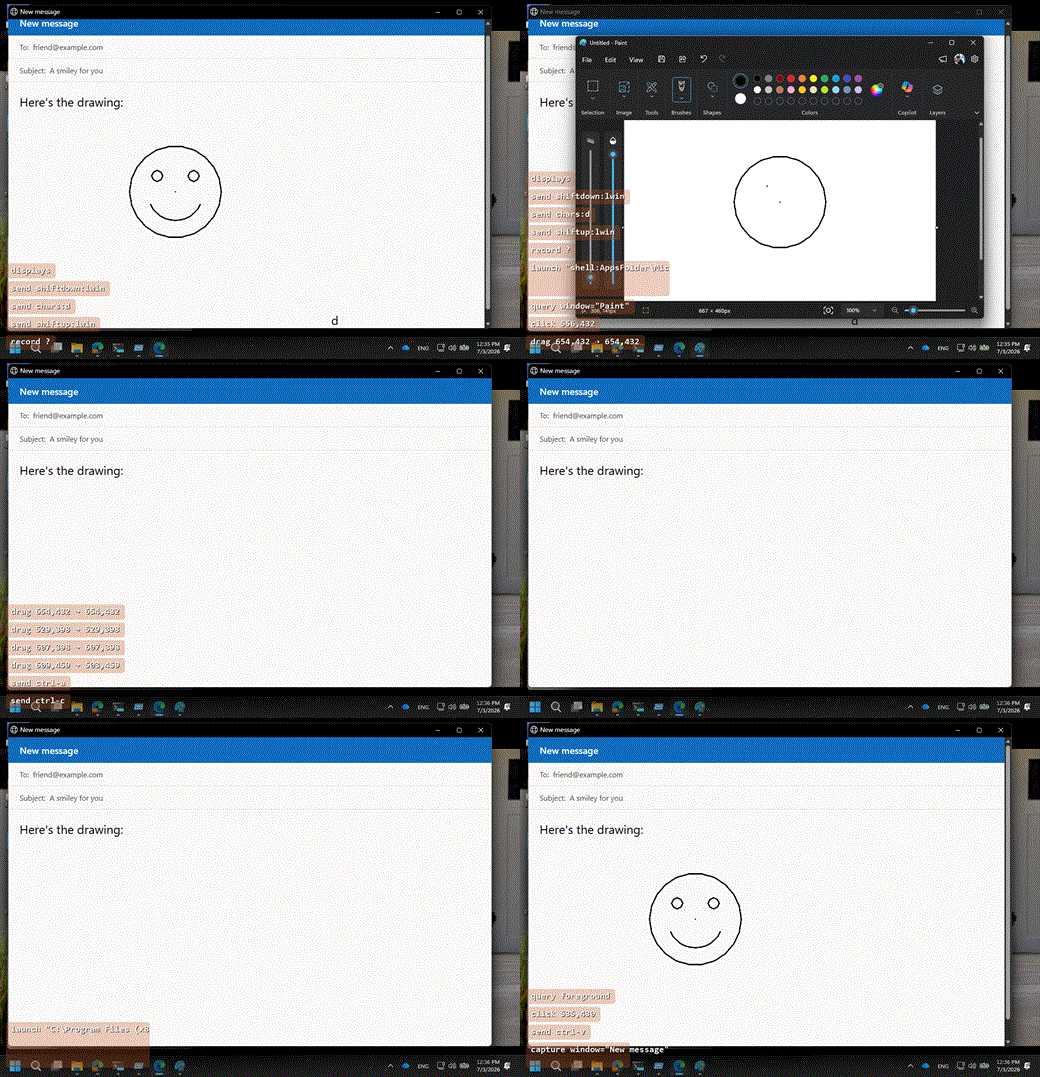
Flavor: Prompt demo. One of the worked Examples; the shared bootstrap, MCP envelope, and targeting gotchas live there and aren’t repeated here.
Recording note: to avoid putting a real inbox in a public GIF, the recording pastes into a neutral mock “New message” page (a local HTML compose form in a chromeless browser window). A real mail client works identically; only the paste target differs.
The prompt
Open Microsoft Paint, draw a smiley face, select it all and copy it to the clipboard, start a new email message, and paste the smiley into the body. Don’t send it, just leave the draft open.
That is the entire input. A capable agent with MCEC mounted plans and executes the rest; the recipe below is a reference for what a good run does, not a script the agent has to be handed.
Preconditions
- Agent surface on, for a disposable copy. Enable the agent gates in a provisioned
session rather than your installed MCEC. This demo actuates,
so it needs (beyond
AgentCommandsEnabled) these commands enabled:launch,click,drag,capture,clipboard, and the keyboard primitives used throughsend_command(chars:,shiftdown:,shiftup:);query/findhelp targeting. - A default mail client. The “new email” step opens the system default handler for
mailto:(Outlook, the Windows Mail/Outlook app, or whatever is registered). If no mail client is configured the step can’t complete; see Gotchas. - An unlocked, interactive session. MCEC injects real mouse and keyboard input.
Recipe
The agent improvises from the prompt; a known-good path is:
- Open Paint.
launch { path: "mspaint.exe" }(or Win+S → typePaint→ Enter). Wait for the window, thenquery { process: "mspaint" }for the canvas bounds. - Focus the canvas. A coordinate
clickinside the canvas so drawing input lands there. - Draw the smiley with the pencil/brush, each stroke a
dragwith a multi-pointpath(press → move along the path → release), the same technique the hero GIF uses to circle the title bar:- Face: a closed circle
pathof points around the canvas center. - Eyes: two short
drags (orclicks) above center. - Smile: an upward arc
pathbelow center.
- Face: a closed circle
- Select all and copy. Ctrl+A then Ctrl+C, sent as real VK+modifier commands (MCEC’s built-in
ctrl-xshows the shape; definectrl-a/ctrl-cas SendInput commands withVk+Ctrl). Do not try to fake an accelerator withshiftdown:ctrl+chars:a:chars:injects a character, which does not reliably trigger an app’s Ctrl+key accelerator, so the copy silently produces nothing. This puts the canvas bitmap on the clipboard. (clipboard { action: "get" }can confirm an image is present.) - Start a new email.
launch { path: "mailto:" }opens a blank compose window in the default mail client (or open the mail app andclickNew mail). - Paste into the body.
clickthe message body to focus it, thenctrl-v(again a real VK+modifier command). A rich composer pastes the bitmap inline. - Stop at the draft. Leave the compose window open; do not send. (For a recording,
recordthe desktop region from step 1 andstophere.)
Expected result
A mail-compose window open with a hand-drawn smiley pasted into the body, and the draft left unsent. As a prompt demo the exact pixels vary run to run; success is “the smiley made it from Paint’s canvas, through the clipboard, into an email body, hands-free.”
Gotchas
- Draw with
dragpaths, not many tiny clicks. A stroke is onedrag(from→path[]→to); integer pixels. Focus the canvas with a coordinate click first, or the first stroke can miss. - Send Ctrl+key as a real accelerator, not
chars:. A heldshiftdown:ctrlpluschars:a/chars:cinjects a character, which does not reliably fire an app’s Ctrl+key accelerator, so the copy produces an empty clipboard and the paste is blank. Use VK+modifier SendInput commands (ctrl-a/ctrl-c/ctrl-v, like the built-inctrl-x). - Copy needs a selection. Ctrl+C copies the current selection; Ctrl+A (or Paint’s Select ▸ Select all) selects the whole canvas so the copy isn’t empty.
- Mail client dependency.
mailto:uses the OS default. If it opens a browser compose (web mail), that still accepts a Ctrl+V image paste in most cases; a client with no rich-paste support is the one setup where step 6 won’t embed the image. (This machine had no configured mail client during recording, which is why the published GIF uses a neutral mock compose page.) - Never click Send. The prompt says leave the draft open; a demo must not send mail. Discard the draft when done.